
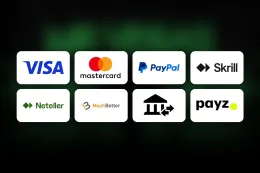

This guide covers how to deposit at Mr Vegas and what stands behind the steps. The steps and the table above show the minimum of £10 and the payment methods, so have your payment method and your account details ready before you open the cashier.
If you do not have an account yet, sign up first. The steps above start with logging in, and a deposit is made from inside your account through the cashier.
What happens behind the steps
Every UK-licensed operator has to verify your age and identity before you can deposit or play, so expect this to come before the cashier. The documents are Valid photo ID and Proof of address, and the verification page covers the process.
The payment methods are Debit cards (Visa/Mastercard), PayPal, Skrill, Neteller, Bank transfer and Paysafecard. They differ in practice. Debit cards are the familiar option and link the payment to your bank account. E-wallets such as PayPal, Skrill and Neteller sit between your bank and the casino, and you need an account with the e-wallet provider first. Bank transfer moves money directly from your bank. Paysafecard is a prepaid voucher.
Credit cards are banned for gambling in Great Britain, so use a debit card. Whatever method you choose, check the details before you confirm.
The minimum deposit is £10. The table above shows which methods also work for withdrawals, and the withdrawals guide explains payouts. If you plan to claim an offer, its own conditions are on the welcome bonus page, and T&Cs apply.
Choose the method with the whole journey in mind. The table above shows which methods also work for withdrawals, so a method that works in both directions keeps things simpler. Decide which account you want your money to come from and, later, return to.
Use a payment method that is in your own name and that you can check easily afterwards. A card or e-wallet you control is simpler to trace if you need to look back at a payment, and it keeps your records in one place.
Check the amount and the method before you confirm the payment. Once a payment is confirmed it is an ordinary transaction on your bank or e-wallet statement, so a typing slip is better caught on the screen than afterwards.
Interface wording differs between sites, so look for the cashier or the deposit section of your account rather than a specific button name.
18+ · T&Cs apply
If a deposit does not go through

Start with the simple causes. Check that you entered the card or account details correctly and that your balance covers the amount. Make sure the amount is at least £10, because the minimum applies to every deposit.
If the problem is the method, try another one from the list, such as a different e-wallet or a debit card, rather than repeating the same attempt several times. Repeated attempts can leave you unsure how many payments have been taken, so check your bank statement or e-wallet before you try again.
If a document is rejected during verification, upload a clearer copy. A photo that is cut off, blurred or dark is the usual reason, and the documents needed are Valid photo ID and Proof of address. The name and details on the document should match the name on the account.
If you cannot get in to start the deposit, contact support to regain access. Live chat, email and phone are all available, and support is open 24/7. Tell the agent what you tried, which method you used and what happened, and keep any reference number you are given.
Before you contact support, collect what the agent will ask for: the method you used, the amount, the time of the attempt and any message you saw. Having these to hand shortens the conversation and helps the agent find the payment quickly.
If a payment was taken but you cannot see it in your Mr Vegas balance, do not pay again. Look at your bank or e-wallet statement, note the amount, the time and any reference, and then contact support with those details. If your own bank declines the payment, the bank is the one that can tell you why, so contact it directly.
Keeping control
Enter your password only on the Mr Vegas website, never on a page that reached you through a link in a message. This site has no login or payment form, and a page that asks for your card details after a link from here is not this site.
Set a deposit limit in your account controls before you pay, and treat the limit as a ceiling, not a target. Only deposit money you can afford to lose, because gambling is entertainment that costs money. If your spending starts to feel hard to manage, the safer gambling page lists the help available, including GamCare and GAMSTOP.
Review your bank or e-wallet statement regularly so that you can see what you have deposited over a month, not just in one session. If the total is more than you intended, use a time-out or set a lower limit.
Keep your login details private and use a device you trust, particularly when you pay. A phone or computer shared with other people is a poor place to stay logged in to a gambling account.
Keep your documents ready so that verification does not hold up your first deposit. Store them in a safe place on your own device, and send them only through the casino's own website or app, never in reply to a message that reached you by link.
Finally, keep a short note of your deposits, with the date, the method and the amount. It takes a minute and makes any later question to your bank or to support much easier to answer.